Wednesday, August 5, 2015

Tutorial: Software for Architects


The creation of architecture drawings, renderings, portfolios and boards can involve many different types of software and there is software than can can meet all your needs. This tutorial outlines the most prevalent ones and how they might be used. Software is generally broken down into vector linework and image processing. Scale linework is important as a basis of any rendering or drawing. Then diagramming, context, habitation, and its environment can be added.

Cultural Community Hub
by KenepaStudio

There are many different software you can use, different add-ons and software versions and possible ways to use them together to create successful designs. The most prevalent software used for architectural design is AutoCAD, Illustrator, InDesign, Photoshop, Revit, Rhino, and SketchUp. Designs typically start to scale, either 2D or 3D and then imported via pdf into another program for tweaking/diagramming/processing, then placed in InDesign for printing.

AutoCAD


AutoCAD is a commercial software application for the creation of 2D and 3D computer-aided design (CAD) and drafting. Released in 1982 by Autodesk Inc., it continues to be the most widely used CAD program in the world. Typically students learn to use AutoCAD in high school or in college, where they learn to draft designs such as buildings or machinery parts. It is usually a prerequisite for college design degrees. AutoCAD Architecture is a version of AutoCAD that is created especially for architects. It has features that allow architects to do a more efficient drafting, creating designs and documents familiar to them. It has the same platform as AutoCAD that makes it easier for experienced architects to understand. There are other CAD programs out there, but remember to learn the version that will help you get a job after graduation. Many firms only use Revit nowadays, so learn and use the software to help you get the job you want.

I personally have used AutoCAD for all my plans, drawings, sections, etc. in school as it is free for students to use and I didn't have time in my schedule to learn another one. Once I have a hard-lined drawing, I use Photoshop or Illustrator to put the final touches on them. Lineweights in AutoCAD can be difficult to set and confusing to use, however Illustrator will allow you to more easily change them and you can add in textures, colors, poché, etc. more easily than you can in AutoCAD. Newer versions will likely make it easier, but use the programs you know to get the result you want.

Indesign


InDesign - src

InDesign is a vital piece of software for any architect. It is used for the creation of pdfs that can be used to post things online, create portfolios or to create architecture boards. Definitely learn this software and if you can, take a course at school or watch videos online. You can set up font types/sizes, page master pages with page numbers, helping increase productivity and document consistency. The software also gives you the ability to package your files together and bring them with you so you can work at school or at home without the hassle making sure you copy each separate file and take it with you. As a student, you can purchase Adobe Creative Cloud for about $20 a month plus tax and it is definitely worth the investment. It will automatically update, you can save your work online on Bēhance and you can also save your screen settings, all of which increases your productivity and exposure as a designer. The non-student version of the Creative Cloud is $30 a month plus tax.

Illustrator


Illustrator

Illustrator can be used for many different things; the creation of diagrams, adjusting of the lineweights of vector files (CAD, SketchUp  or Revit pdfs) and the creation of renderings. I personally learned this piece of software late and I regret it, especially after all those hours I spent fighting with CAD to get the lineweights right. I and others have also found that the hatching in CAD tends not to print correctly, but with Illustrator you can add wall poché, textures or people silhouettes much easier and with less errors than in CAD. It also works with Revit plans or 2D pdf files from Sketchup which helps a lot with 3D building diagrams, sections, elevations or plans. You can also link Photoshop files into the Illustrator files or visa verse to help you make superb renderings. I highly recommend creating your diagrams in Illustrator and saving them as pdfs so they can be viewed on any computer, and easily placed into Indesign files or printed. Creating diagrams over plants or sections in Illustrator can also be easier since the pen tool will snap over line endpoints or 'anchors'. You can download this as part of your Adobe Cloud membership.

Photoshop


 Photoshop - src

When creating renderings, whether it is a section, elevation or plan, knowing how to use Photoshop is absolutely vital. Definitely take a class at school or watch tutorials online. Photoshop is usually used in conjunction with other software like CAD, Revit, SketchUp, or Illustrator. It is used for image processing, adding textures (like brick, stone, etc.), landscape, people, a sky, etc. You can use it for just about everything, once you learn how to use it. It is also a great way to fix and edit scans of your work and create vignettes, etc. Also part of an Adobe Creative Cloud membership.

See more from the Architecture Student Blog:
Learn to create an architectural section in Photoshop
Adding a sky in Photoshop

AutoDesk Revit


Revit - src

Revit is programmed for building information modeling or BIM, which is the key for a sustainable design and coordination. The changes that you make will be automatically coordinated throughout the project that you are working on. This helps architects make a consistent and complete project. The features are easy to understand to help you start a complete, consistent and error free design and is based on AutoCAD. This program is much easier than AutoCAD to create sections, plans, etc. and most firms use this software so you should definitely learn it (ask around). You can also create 3D renderings from this software which can be a lifesaver when working on studio projects. Students can download and use Autodesk Revit for free, however it is not for commercial use so when files are used, they are saved as a student version. Commercial users can download a trial version.

Rhinoceros 3D (Rhino)


Rhino - src

Developed by Robert McNeel & Associates, Rhinoceros 3D (Rhino) is a stand-alone, commercial NURBS-based 3D modeling tool. It is commonly used for industrial design, architecture, marine design, jewelry design, automotive design, CAD/CAM, rapid prototyping, reverse engineering as well as in the multimedia and graphic design industries. Rhinoceros 3D gained its popularity in architectural design in part because of the Grasshopper plug-in (parametric modeling tool) for computational design. There are also several other rendering plug-ins developed by McNeel: Flamingo (raytrace), Penguin (non-photorealistic), Bongo and Brazil (advanced). There are over 100 third-party plug-ins available.

In school, Rhino is typically used to figure out 3D issues, however it can be used to take a CAD 2D file and quickly import it and create a 3D section axonometric for example. Rhino’s increasing popularity is based on its diversity, multi-disciplinary functions, low learning-curve, relatively low cost, and its ability to import and export over 30 file formats, which allows Rhino to act also as a ‘converter’ tool between programs in a design workflow.

Sketchup
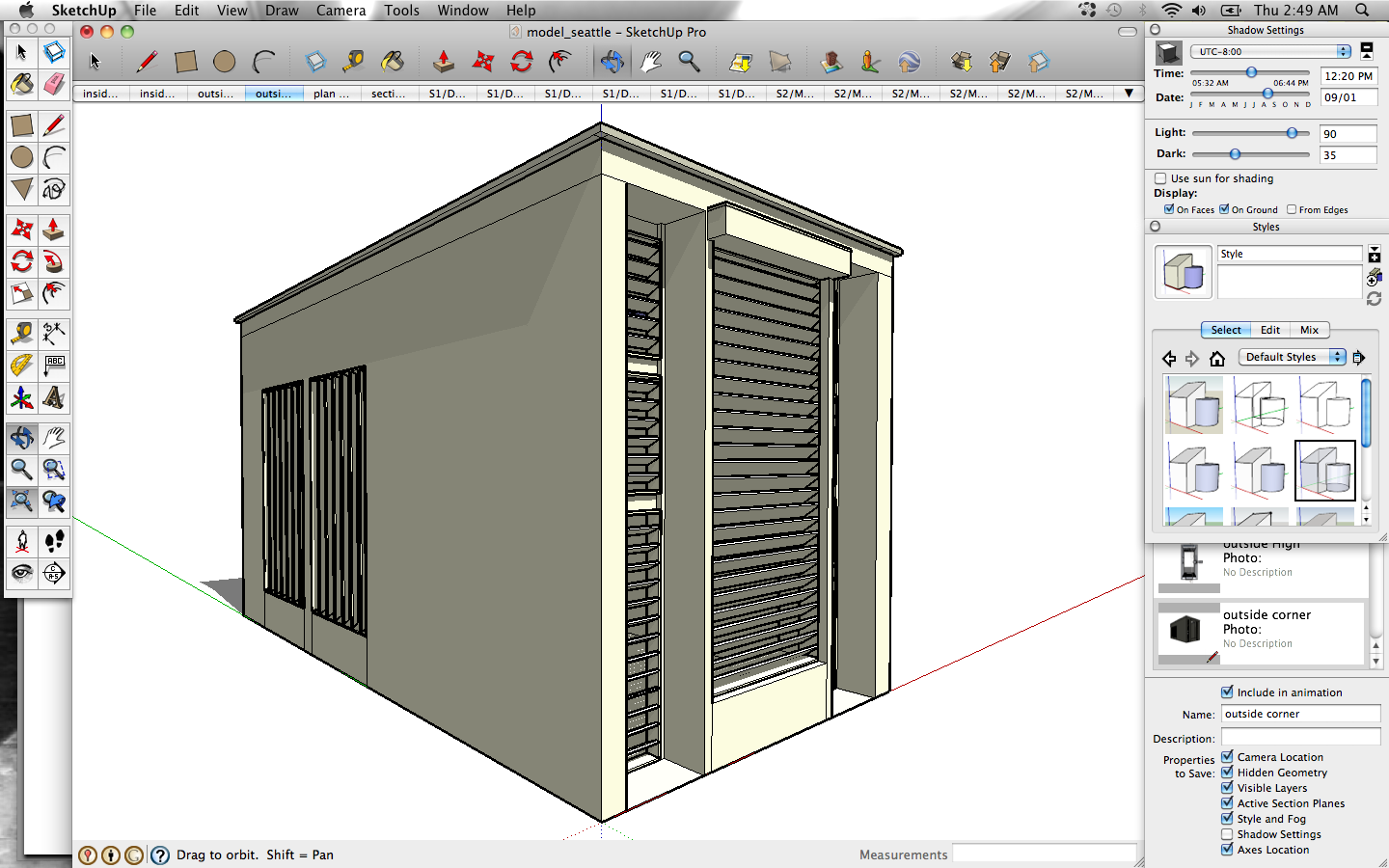

SketchUp - src

SketchUp allows the user to quickly and easily make 3D designs. It can be downloaded for free however many of its export features are disabled. SketchUp Professional or Pro has all the program's functions and comes with SketchUp Make, which creates plans, sections, etc. for scale printing of your 3D design. Buying SketchUp Pro is quite expensive for a commercial version. A student license is a mere $49 at the time of this article though you can likely work on it at school for free. If your computer has a good graphics card and plenty of ram, it is definitely worth purchasing. Be warned that you must submit your information through a third party in order to receive the discount but your license will work for a year from purchase.

Printing to scale is quite difficult from SketchUp without using Make, however you can export a design into a drawing or .dwg file can use this file in CAD or Revit to start your design or visa versa. You can also download people, buildings, furniture, vehicles, etc from the SketchUp 3D Warehouse which can be great for the creation of design vignettes or renderings of your designs. Perfecting a rendering in SketchUp alone is also very difficult and there are many add-ons that can help you a lot with your design. In school, I typically use SketchUp to create a 3D version of my building, export pictures, print them and trace over them, embellishing the vignette, coloring, scanning and using PhotoShop to overlay the SketchUp shadows, textures, etc. Screenshots of SketchUp models tend to be over-saturated and the textures you can use also are very cartoon-like however it can become a vital step in your design process.


Additional Information on Computer Rendering

If you are looking for a book on computer rendering, Bradley Cantrell and Wes Michaels' book, Digital Drawing for Landscape Architecture: Contemporary Techniques and Tools for Digital Representation in Site Design, even though it is for landscaping outlines the requirements and techniques for Photoshop rendering beautifully. Look for used or new books from an amazon seller since they are generally cheaper than Amazon even with shipping. Always be sure check seller reviews!


Sunday, December 28, 2014

Film: Design Trilogy - Objectified

Objectified is a feature-length documentary film on industrial design, directed by Gary Hustwit. It examines the role of everyday non-living objects in our daily lives and the people who design them. According to Swiss Dots Production, the film is the second part in a 3-film series Design Trilogy, the first film being Helvetica which is about the famous typeface and the third film being the documentary Urbanized which discusses city design.

Objectified is a look at the creative work behind everything from toothbrushes to tech gadgets. It's about the designers who re-examine, re-evaluate and re-invent our manufactured environment on a daily basis. It's about personal expression, identity, consumerism, and sustainability.

The movie leaves the viewer having been sensitized to what is perhaps its strongest invocation: the notion of intention. This film outlines the ephemeral experience of every designer, who has their dreams and desires that motivates them. The most important aspect is how every designer does things intentionally. Everything is designed and design is synonymous with intention, a lesson that designers and non-designers should understand. This movie is available on Netflix.


Saturday, August 9, 2014

Solar Decathalon 2002: Trojan Goat

Trojan Goat - by Pakesh Patel
From 2000 to 2002, architecture and engineering students at the University of Virgina worked on the first Solar Decathlon held on the National Mall in Washington D.C. sponsored by the U.S. Department of Energy. Fourteen team designed and built homes powered entirely by the sun. The house won 1st place for architecture (by judges that included Glenn Murcutt) and 2nd place overall. The team also tied for 1st Place in the Energy Balance category, and received several other awards.

The solar-powered house uses renewable energy systems, and integrates building materials that maximize energy efficiency, while minimizing environmental impact. A moveable facade can be adjusted to change the home's insulating values depending on the weather. The solar roof array powers the home and stores excess electricity in a battery array for use at night. Once the batteries are fully charged, excess power supplies the grid.  The 750 square-foot home includes a living room, dining area, kitchenette, home office space, bathroom, bedroom and sunspace. The award-winning solar home was donated to the Piedmont Housing Alliance (PHA), a Charlottesville non-profit housing organization. The PHA sold the home to raise funds for their low-income housing programs.

Trojan Goat: Living Space - by Pakesh Patel

Assistant Professor John Quale of the School of Architecture and Professor Paxton Marshall of the School of Engineering and Applied Science advised the UVA Solar Decathlon team over the course of the two-year project. Former engineering research scientist Dan Pearce also advised the group. After the Solar Decathalon, John Quale initiated and serves as Director of the ecoMOD / ecoREMOD project, an interdisciplinary effort to design, build and evaluate prefabricated and renovated housing units for affordable housing organizations.

Trojan Goat: Bedroom - by Pakesh Patel

Sources


John Quale - Director of the Graduate Architecture Program at UVA - Click through for info on the Trojan Goat
ecoMOD Trojan Horse Project Site
UVA Donates the "Trojan Goat" Solar House to the PHA

Thursday, August 7, 2014

BIQ House

BIQ House Rendering - src
Hamburg, Germany - The 15 unit Bio intelligent Quotient (BIQ) House, part of the 2013 International Building Exhibition, was built to test the world's first "bio-adaptive" facade, which uses micro-algae to shade the building as well as generate energy, designed by Arup, SSC Strategic Science Consultants and Splitterwerk Architects. As the world's first building powered by algae, the facade's bioreactors use photosynthesis to grow the algae, which is then harvested and converted to biomass for energy generation. This process for generating sustainable, renewable energy creates a shimmering, dynamic green facade for the building. The micro-algae, about the size of bacteria, are generated in reactor panels that are supplied with nutrients and carbon dioxide in order to grow. These panels are the secondary skin of the building envelope covering 2,150 square feet of the southeast and southwest facades.

Algae Bioreactor Modules getting Carbon Dioxide - src

The BIQ house has a holistic approach to its energy concept. It captures all the energy needed to generate its electricity and heat from the sun, leaving fossil fuels untouched. The facade includes 129 bioreactors, which help to insulate the building and keep out noise. The height of the algae can be changed to help with daylighting or provide shading from direct sun. Each reactor is controlled by an energy management center which harvests the algae and solar thermal heat as well as turns the reactors towards the sun. Excess heat from the sun, unused by the algae, is either used directly for solar hot water or stored in tanks under the building for later use. When the algae hits a certain rate of growth, some of the algae is harvested and taken into the building for processing, where the biomass is converted into biogas which can be burned to provide heat in the winter and electricity. The carbon dioxide from burning the biogas is then used to feed the algae.

Jan Wurm, Arup’s Europe Research Leader, said: ‘Using bio-chemical processes in the facade of a building to create shade and energy is a really innovative concept.
‘It might well become a sustainable solution for energy production in urban areas, so it is great to see it being tested in a real-life scenario.’

The news comes after Arup announced their vision for the future of skyscrapers which suggested that buildings would be ‘living’ buildings powered by algae that respond automatically to the weather and the changing needs of inhabitants.

Bioreactors - src

Videos


Sources

IBA Hamburg
Micro-Algae Tested for Green Building Facade

Tuesday, August 5, 2014

P.F.1 (Public Farm 1) by WORK Architecture Company

Designers: Amale Andraos, Dan Wood
P.F.1 - © Elizabeth Felicella
Public Farm One, by WORK Architecture Company, was the winner of the Young Architects Program, run by the New York Museum of Modern Art and the PS1 Contempoary Art Center, to design a temporary installation in the courtyards of PS1 in Queens, NY in 2008. This temporary installation was a shift from the previous 40 years concept of the Urban Beach into a new leisure revolution, one that created a new symbol of liberation, knowledge, power and fun for the city. The Urban Farm became the symbol for their "generations' preoccupations and hopes for a better and different future." Since cities have become accepted as having superior benefits to the suburbs, including quality of life and environmental impacts, they now have become the place of experimentation. Public Farm 1 (P.F.1) "is an architectural and urban manifesto to engage play and reinvent our cities, and our world, once again." 


by WORKac

Structure

With the desire to embrace the city's grid as an organizing patter, WORKac created a daisy pattern of six tubes arranged in a hexagon around a seventh tube. This central tube alternates between a structural column or a "picking hole" to access and harvest the crops above. Since this was a temporary installation, they decided to work with cardboard tubes which would be recyclable and biodegradable as the primary building material. Wood blocking and bolts were added to each tube for additional strength and for attaching them together.

by WORKac

Plantings

WORKac selected 51 varieties of herbs, fruit and vegetables to thrive in the urban environment and planted to bloom in succession throughout the summer. The plants are also organized by the “daisy pattern,” each daisy planted with a single species.

Plant Diagram - by WORKac

Irrigation and Power

Rainwater was collected into a cistern from the roof of PS1 which collected over 6,000 gallons of rainwater over the course of the exhibit. The plants were irrigated by a extemely efficient drip irrigation system. P.F.1 was designed to be completely off-grid. An array of eighteen photovoltaic modules was sized to power all of the pavilion's loads - videos screens, speakers, lights, cell phone chargers and all of the irrigation pumps.

Systems Diagram - by WORKac

Pavilion Programming

Each column is programmed to create a variety of experiences and interactions beneath the farm. These include a solar-powered juicer for fresh veggie cocktails, a periscope to provide close-up views of the fields, a towel column and a water-spouting column next to the pool, two columns joined together with a bench and enclosed by a curtain to provide privacy, a nighttime column of twinkling stars and cricket sounds and a solar-powered phone-charging column. In the smaller courtyard a series of experiential columns use video and sound to bring animal life to P.F.1 simulating the farm experience in this urban environment.

Ground Program - by WORKac

P.F.1 - by WORKac

Video

The following video shows the creation of Public Farm 1, including construction issues, how it was created and the methods they used to make this fascinating concept a reality.


Public Farm 1 - Sur les Pavés la Ferme from WORKac on Vimeo.

Sources

WORK Architecture Company
MoMA Public Farm Exhibit Webstite

Sunday, June 15, 2014

Design Help: Kitchen Cabinet Dimensions

Kitchen with Standard Cabinets - Source

Kitchen cabinet sizes are largely standardized. Unless you are dealing with custom kitchen cabinetry, which can build cabinets with any dimensions, you will find lower prices and predictable sizing in stock or semi-custom kitchen cabinets. Because kitchen cabinets come in hundreds of sizes, below is a guide to a few of the more common kitchen cabinet sizes.


Standard Cabinet Dimensions

1. Base Cabinet Sizes

Base cabinets are the workhorse of kitchen design. They are installed directly on the floor, counters are installed on them, sinks installed within them, dishwashers and ranges bracketed by them, etc. See more about sink base cabinets below.

Height and Depth
  • Height: 34.5". After adding counter top materials, total height will raise to 36".
  • Depth: 24". Base cabinets tend to be limited to 24". Deeper base cabinets make it difficult for you to reach the back of the counter or to plug in appliances.
Width:
  • 12", 18", 24" Filler cabinetry.
  • 48": Typically the largest size base cabinet, not often used. 
  • Custom Width cabinets are always available, of course you will pay more for them


2. Wall Cabinet Sizes

Height and Depth:
  • Height: Common wall cabinet heights are 12", 36", and 48". The 12" cabinets fit neatly over fridges.
  • Depth: 12" to 24". Maximum depth for wall cabinets is 24" because it cannot exceed the depth of base cabinets.
Width:
  • A standard, single- or double-door wall cabinet width is 30". Cabinets can run as narrow as 12" or 15". Cabinets wider than 30" are generally not used.


3. Tall Cabinet Sizes

Tall kitchen cabinets, also known as a pantry or utility cabinet, often reach ceiling height. Be aware of how high your ceiling are if you would like to put crown molding above it.

Height and Width:
  • Height: 84" to 96". Those 96" cabinets take you right up to the ceiling. The 84" tall cabinets give you one foot of breathing room above the cabinet--but no practical purpose to that above-cabinet spacing.
  • Depth: 12" to 24". Shallower, 12" deep pantry cabinets are common because they are used for storing food. If the cabinets are deeper, it is likely you would lose food in the the back of the cabinet.
Width:
  • 12": Narrow pantry cabinets hold far more food than you might think. Plus, they can fit in otherwise-neglected spaces. 
  • 24": Another common pantry cabinet width.
  • 36": If you want bells and whistles, such as pull-outs and storage on the doors, you'll need a wider pantry cabinet.

4. Sink Base Cabinets

Sink base cabinets are specialized base cabinets. Be mindful of what size sink you would like to install to help you decide which one to get. Also note the depth of the sink, it will help decide which sink base you need for your design.

Height and Depth
  • Height: 34.5". Again, after adding counter top materials the total height will increase to 36". A farm sink might replace the top of the cabinet varying the height. Consult your kitchen designer for a specialty cabinet.
  • Depth: 24".
Width:
  • 30": Single-basin sink.
  • 33": Can accommodate a double-basin, offset sink.
  • 36": Can accommodate a double-basin sink.

    Thursday, May 29, 2014

    Film: My Architect

    My Architect: A Son's Journey is a documentary film by Nathaniel Kahn on his father, Louis Kahn (1901-1974), detailing the architect's extraordinary career and his family legacy after his death.

    Louis Kahn is quoted in the film saying “When I went to high school I had a teacher, in the arts, who was head of the department of Central High, William Grey, and he gave a course in Architecture, the only course in any high school I am sure, in Greek, Roman, Renaissance, Egyptian, and Gothic Architecture, and at that point two of my colleagues and myself realized that only Architecture was to be my life. How accidental are our existences are really, and how full of influence by circumstance.”

    The film includes interviews with renowned architects, including Frank Gehry, Shamsul Wares, I.M. Pei, Anne Tyng and Philip Johnson. Throughout the film, Kahn visits all of his father's buildings including: The Salk Institute, The Yale Center for British Art, Jatiyo Sangshad Bhaban and the Indian Institute of Management Ahmedabad.